How to compress a PDF to under 1MB
Updated 20 August 2026
Scans and image-heavy PDFs a few megabytes in size usually fit under 1MB with Balanced compression in your browser — text stays selectable. Mostly-text documents are already lean: they shrink less, and re-rendering them as images makes them bigger, not smaller. The tool reports the true result either way.
Get a PDF under 1MB free in your browser — no upload, no watermark. Measured results by document type, and the one mode to avoid on text.
UnboundPDF is a free suite of 54 PDF and image tools that run entirely in your browser — merge, split, compress, edit text, OCR in 126 languages, redact, sign, convert and archive to PDF/A. Your document is read and written by the page on your own device; there is no document-upload endpoint in the core tools, no account, no watermark and no daily cap. Every result can be checked — with the Network tab, or with the Document Passport the Workspace writes for a chain of steps.
- Open Compress PDF and add your file; processing is local to your device.
- Run Balanced at the default target and read the before/after report.
- For scans still over 1MB, switch to Maximum — image pages lose nothing visible.
- For text documents still over 1MB, split by pages instead of forcing quality down.
Measured 13 August 2026, real tool, real public documents, sizes as the tool reports them. Where a run failed the target, the failure is printed here too — that's the point.
1MB by document type — the real table
| Document | Before | Balanced | Maximum (default) |
|---|---|---|---|
| 3-page scan | 784 KB | 418 KB ✓ | 238 KB ✓ |
| 1-page scanned letter | 141 KB | 84.6 KB ✓ | 57 KB ✓ |
| 15-page paper with figures | 2.1 MB | 1.7 MB ✗ | 1.7 MB ✗ |
| 80-page mostly-text report | 1.4 MB | 1.3 MB ✗ | 10.5 MB — backfires |
Two lessons the table teaches better than any slogan: scans sail under 1MB, and Maximum mode on a text document makes it dramatically larger — 1.4 MB became 10.5 MB. The tool catches that case and tells you to keep your original.
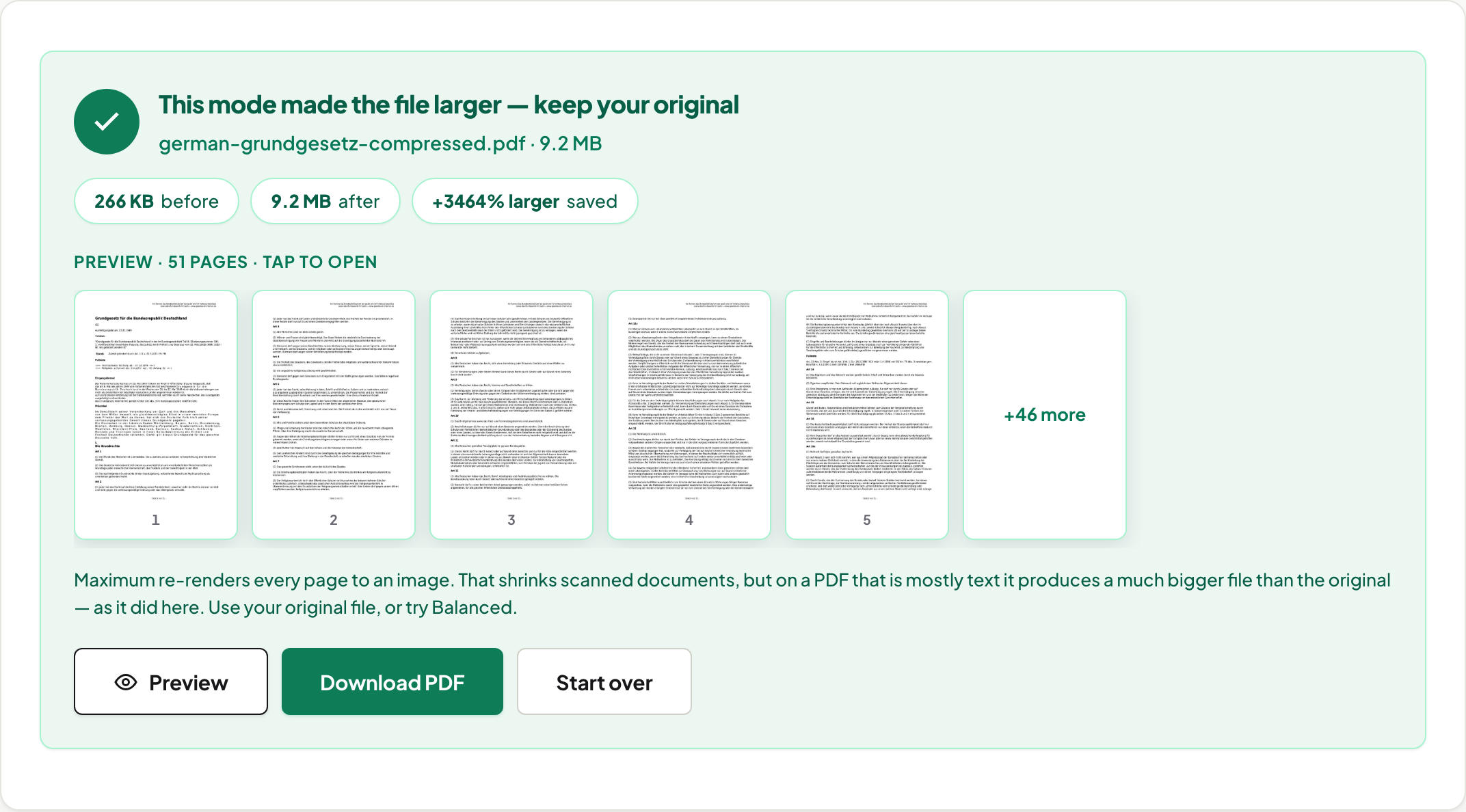
Why text documents resist — and why that's fine
Text in a PDF is instructions, not pixels; it is already close to its minimum size. A document that misses 1MB in Balanced mode isn't failing — it's telling you its content genuinely needs the space. The moves are structural: split out the pages you need, cut into under-1MB parts, or pull out the images if those are what the recipient wants.
The scan route
Scans are images, so they compress like images: our 3-page scan, in Chrome, lost 47% in Balanced and 70% in Maximum with nothing a reviewer would notice at reading size. How much you get back also depends on the browser, not only on the document: measured on 15 August 2026, the same 119 MB scan came out at 34% of its original size in Chrome, 39% in Firefox and 57% in Safari's engine, because that path re-encodes photographs with the browser's own JPEG encoder. Crooked scans should be deskewed first; scans that must stay searchable should get browser-local OCR and then Balanced, which preserves the invisible text layer.
Common 1MB walls
Old email gateways (the modern providers allow far more — verified numbers in the email guide), application systems, and content managers with legacy caps. Tighter targets: 500KB · 100KB. Looser: 2MB. Portal-specific caps, including USCIS's documented 12MB: government portals.
Scope
Password-protected files are unlocked first. What is in your file sets how much there is to win: in Chrome, the same slider produced −78% on a scan and −3% on an already-optimised paper the same afternoon, and reported both. Photographs are re-encoded with the browser's own JPEG encoder, so those figures are Chrome's. Verify the no-upload architecture yourself in the Privacy Lab.
What the compressor actually does
No magic: a PDF's size is nearly always its images. Balanced mode re-compresses each photo just enough, working in the JPEG's own coefficient domain so untouched parts of the image are not re-encoded, and leaves the text layer alone — text stays selectable, and the pages remain real pages. Maximum mode renders pages to images at a quality you choose, which goes smaller but trades away selectable text; the tool says so before you pick it. Fonts and structure are carried over, not rebuilt. That is the whole method, stated because most tools won't name theirs — and it is why a text-only PDF barely shrinks: there is nothing heavy to re-compress, and the fix is fewer pages (split) rather than harder squeezing.
A password-protected file first needs unlocking
An encrypted PDF can't be recompressed as-is — remove the password (you need to know it), compress, and re-protect with Protect PDF if it should stay locked.
Frequently asked questions
Why won't my text PDF get under 1MB?
Because there is little to remove: text and vector graphics are already compact. Our measured 80-page text report only gave up 9% in Chrome — Balanced re-compresses embedded photos in pure JS, so text-only files show no cross-engine split in our matrix fixtures, and this document has no photos to make it any different. Forcing it through Maximum's image re-rendering made it seven times BIGGER in Chrome; that ratio is browser-dependent, like every Maximum-mode result on this site. For text files over budget, reduce pages — don't chase ratio.
Does compressing to 1MB blur my document?
Balanced mode doesn't touch text or vectors at all — it re-compresses embedded photos just enough to hit the target, and stops at the point of visible damage even if that means missing it. You get the real number, not a damaged file.
Is there a page limit?
No fixed cap. Page count mostly costs time, and the photographs cost more than the pages: measured on 2026-08-15, a 1,000-page text document compressed in under two seconds on all three browser engines, while a 300-page scan took 13-16 seconds. An 80-page report and a 2-page form go through the same local engine. Page count does tell in page-image exports, where every page becomes its own image.
Are my files uploaded while compressing?
No. The engine runs in your browser; no server receives your document. You can watch the Network tab and see for yourself while it works.