How to compress a PDF to 500KB without wrecking it
Updated 16 August 2026
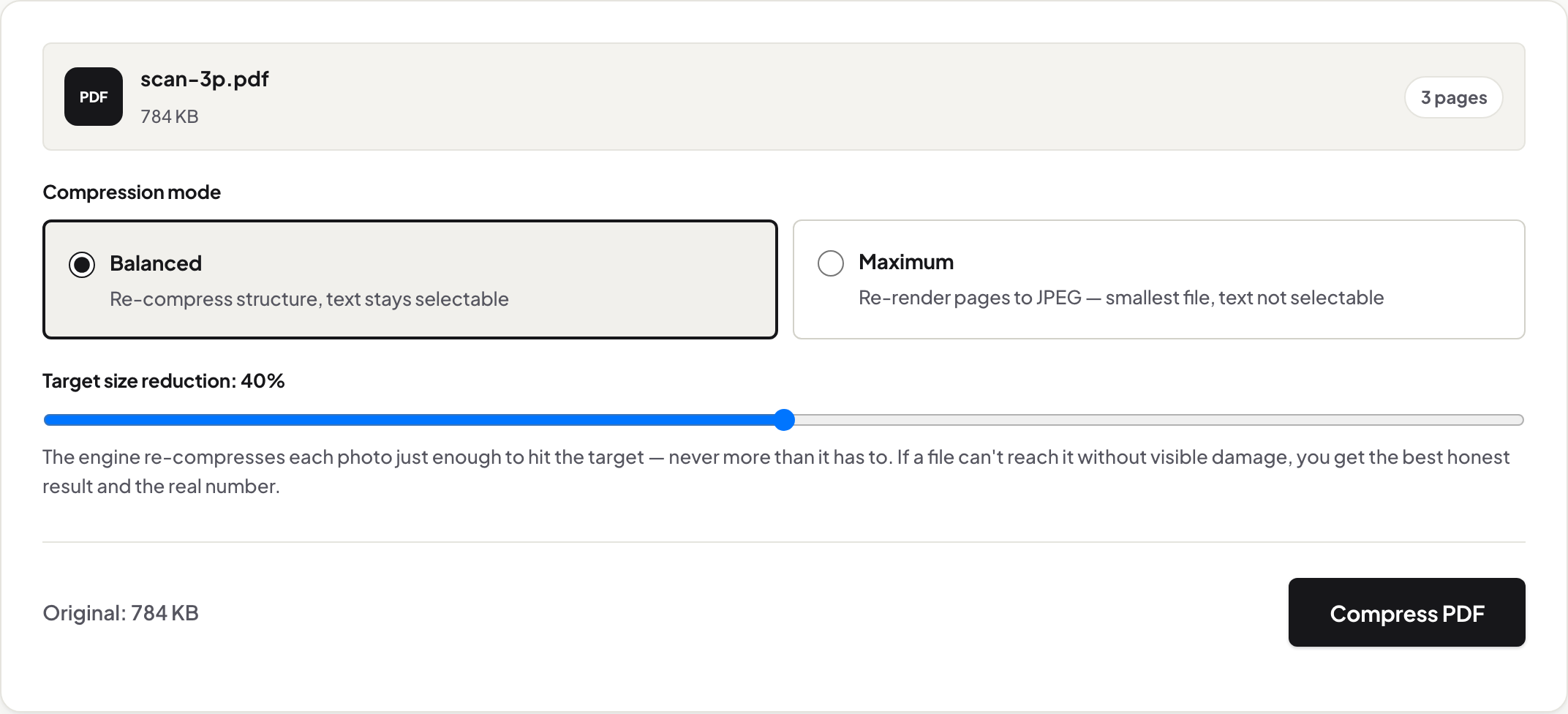
Most scans and image-heavy PDFs under a few megabytes fit 500KB. In your browser, run Compress PDF in Balanced mode first — a measured 784KB scan came out at 418KB with pages untouched. Maximum mode took the same file to 238KB. Nothing uploads; the sizes reported are real.
Shrink a PDF under 500KB free in your browser. Measured: a 784KB scan hit 418KB in Balanced, 238KB in Maximum — nothing uploaded.
UnboundPDF is a free suite of 54 PDF and image tools that run entirely in your browser — merge, split, compress, edit text, OCR in 126 languages, redact, sign, convert and archive to PDF/A. Your document is read and written by the page on your own device; there is no document-upload endpoint in the core tools, no account, no watermark and no daily cap. Every result can be checked — with the Network tab, or with the Document Passport the Workspace writes for a chain of steps.
- Open Compress PDF and drop your file in — it stays on your device.
- Run Balanced and check the reported after-size against 500KB.
- If you're still over, switch to Maximum — on scans it costs nothing visible.
- Download, and send or upload a file that fits the cap.
Every number here is a measurement from 13 August 2026 — the real tool, driven in a browser, over named public documents. The result panel reports before/after sizes on your own files the same way.
The measured route to 500KB
A 3-page scanned document, 784 KB: Balanced took it to 418 KB — under target on the first pass, scan quality visibly intact, and reported as −47%, in Chrome. Switching to Maximum at default quality reached 238 KB, and the quality floor reached 174 KB. For scans, 500KB is a comfortable target; you rarely need the floor.
Balanced first, always
Compress PDF's Balanced mode re-compresses the photos inside your file in the JPEG coefficient domain — just enough to reach the reduction you set, never more. Text, fonts and vector lines are untouched, so a compressed contract still reads and selects like the original. It also refuses to pretend: ask it for 40% on a file that can only give 9%, and it says so in the result panel.
When Maximum earns its place
Maximum re-renders each page to a JPEG. On a scan — already an image — that trade costs nothing you can see at reasonable quality, which is how the 784 KB scan reached 238 KB. On a text document the same trade backfires: our 80-page mostly-text report went from 1.4 MB to 10.5 MB in Maximum, and the tool's own result panel says to keep your original. That warning is a feature, not an apology.
Files that laugh at 500KB
A 75-page paper full of vector figures measured 6.5 MB and gave up only 3% in Chrome — its images were already as small as they can go without damage, and the tool said exactly that. For documents like this, 500KB means fewer pages: extract the pages that matter, or let Split by Size produce parts that each fit the cap.
Common 500KB situations
Application portals with per-file caps, email systems on old corporate limits (see compressing for email, with the providers' verified numbers), and government upload systems. If your target is tighter, the 100KB guide covers what is and isn't achievable; looser caps are covered at 1MB and 2MB.
Scope
Content decides the ratio, and the tool reports the real one. Encrypted files are unlocked first. When a file is already optimal you are told so — your original is kept as the best version rather than replaced by a larger "compressed" one.
Verify the privacy claim yourself
The whole run happens in your browser — your document never travels. Watch the Network tab while compressing, or follow the Privacy Lab walkthrough to prove it on a test file before trusting a document that matters. More on why that architecture is also faster: measured round-trips.
Frequently asked questions
How much can a PDF be compressed?
It depends on what's inside, and on which browser you run it in. In our measured runs, all in Chrome (13 August 2026), a 3-page scan lost 47% in Balanced and 78% at Maximum's floor; a lean text document lost 20%; an already-optimised paper lost 3% — and the tool reported each real number instead of a slogan. Those figures are Chrome's: measured on 15 August 2026, the same 119 MB scan came out at 34% of its original size in Chrome, 39% in Firefox and 57% in Safari's engine, because that path re-encodes photographs with the browser's own JPEG encoder.
Can I compress a password-protected PDF?
Not directly — an encrypted file has to be unlocked first. Use Unlock PDF with your password, then compress the unlocked copy. Both steps run in your browser.
Will 500KB be enough for a job or visa portal?
Often, but read the portal's own stated cap — they vary widely. USCIS, for example, documents a 12MB per-file limit, while some application systems cap uploads far lower. Compress under the stated number with margin.
Is there a file size limit on the tool?
No fixed cap, and we will not quote one. What was measured on 2026-08-15 on one desktop machine (Apple M4, 16 GB, macOS): Balanced compression completed a 300-page 119 MB scan and a 500-page 99.6 MB document on Chrome's, Firefox's and Safari's engines, and every output was reopened and checked in an independent PDF reader. Those are the largest files we watched it finish, not the point where it stops. Large files simply take longer, because the work happens on your machine, not on a server — and how much smaller the file gets depends on the browser as well as the document: the same 119 MB scan came out at 34% of its original size in Chrome, 39% in Firefox and 57% in Safari's engine, because that path uses the browser's own JPEG encoder.