Blog
Write-ups with real screenshots, plus every guide and how-to on the site in one place.
Blog
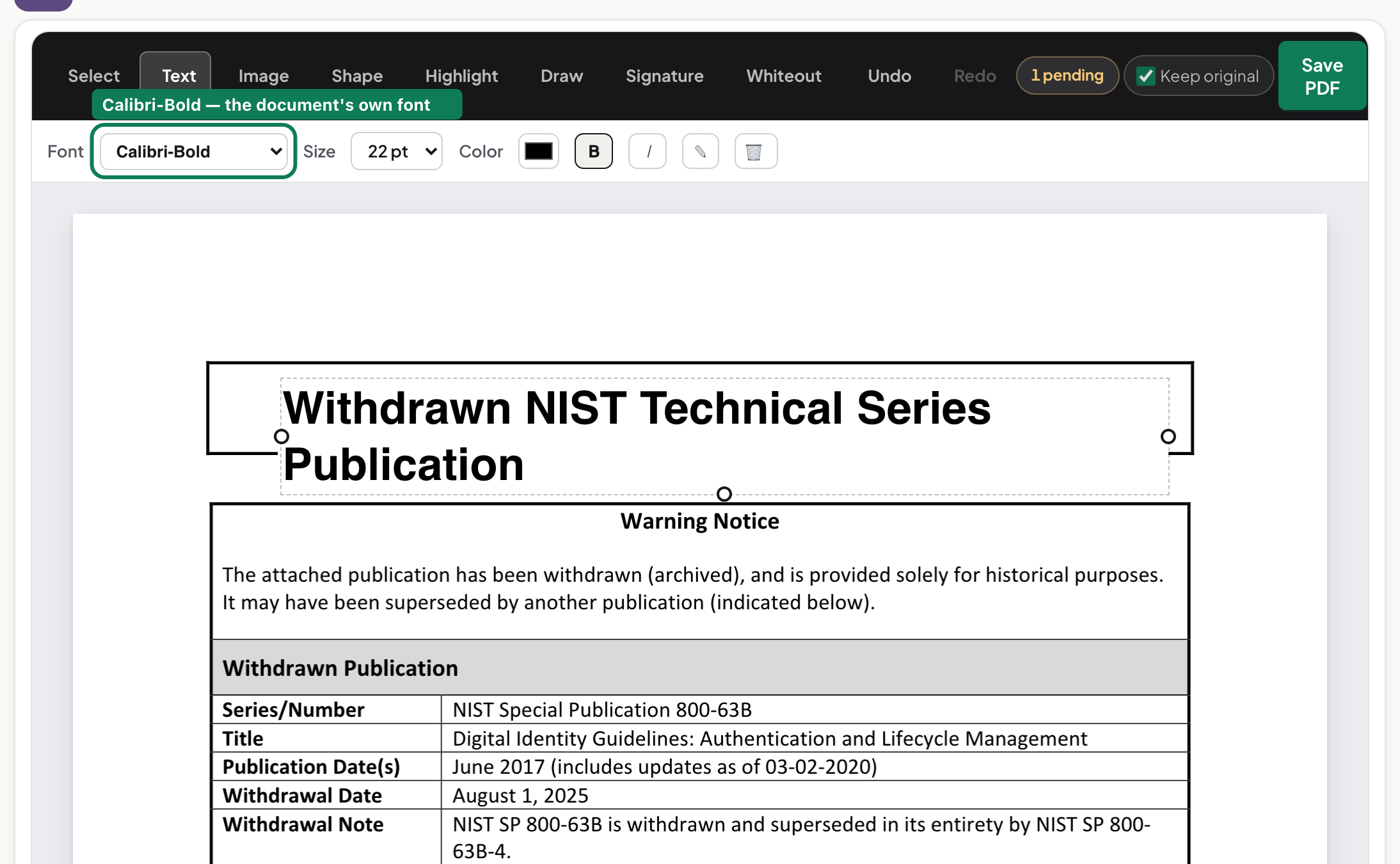
What actually happens when you edit PDF text and keep the same font

Blog
Redacting a PDF properly — and then trying to un-redact it
Blog
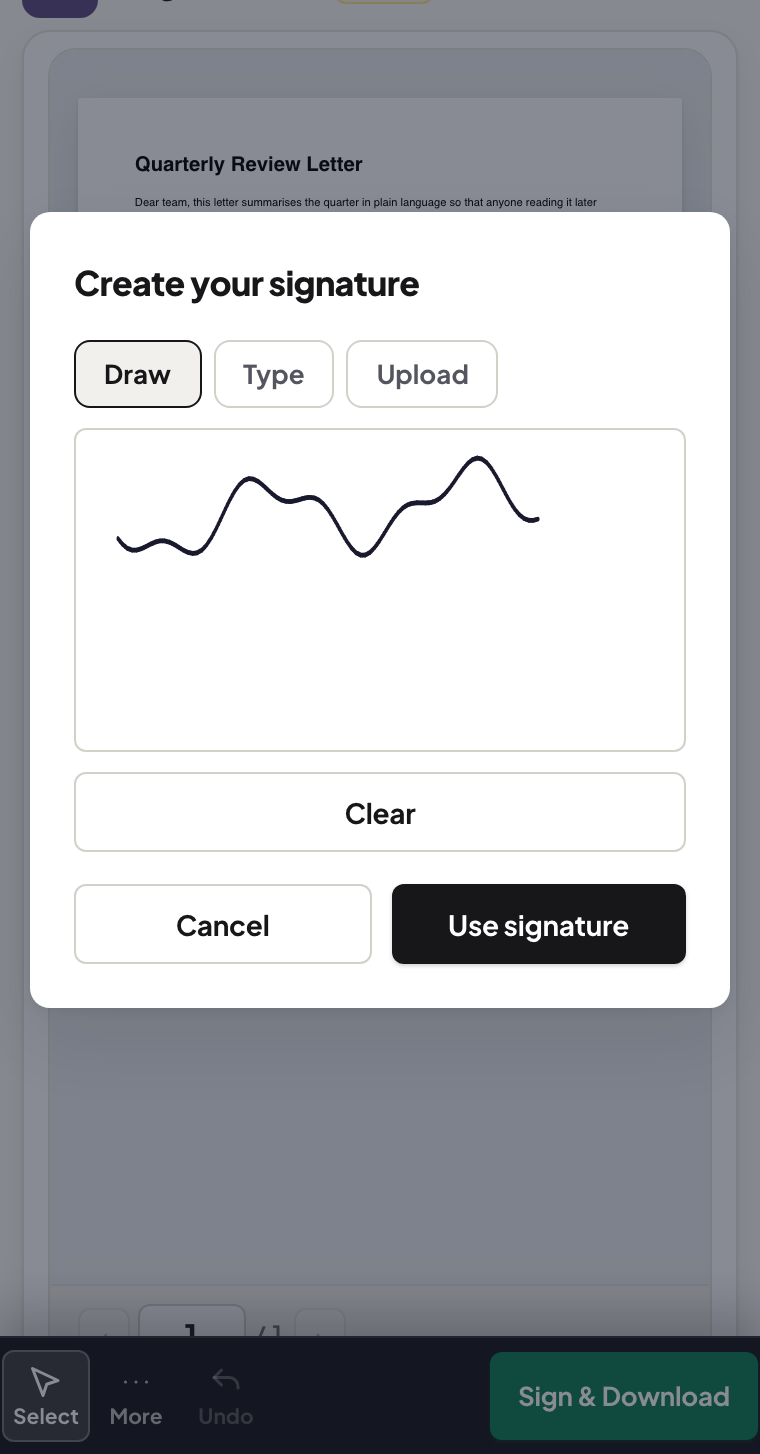
Signing a PDF on your phone — no app, no upload, no printer
Blog
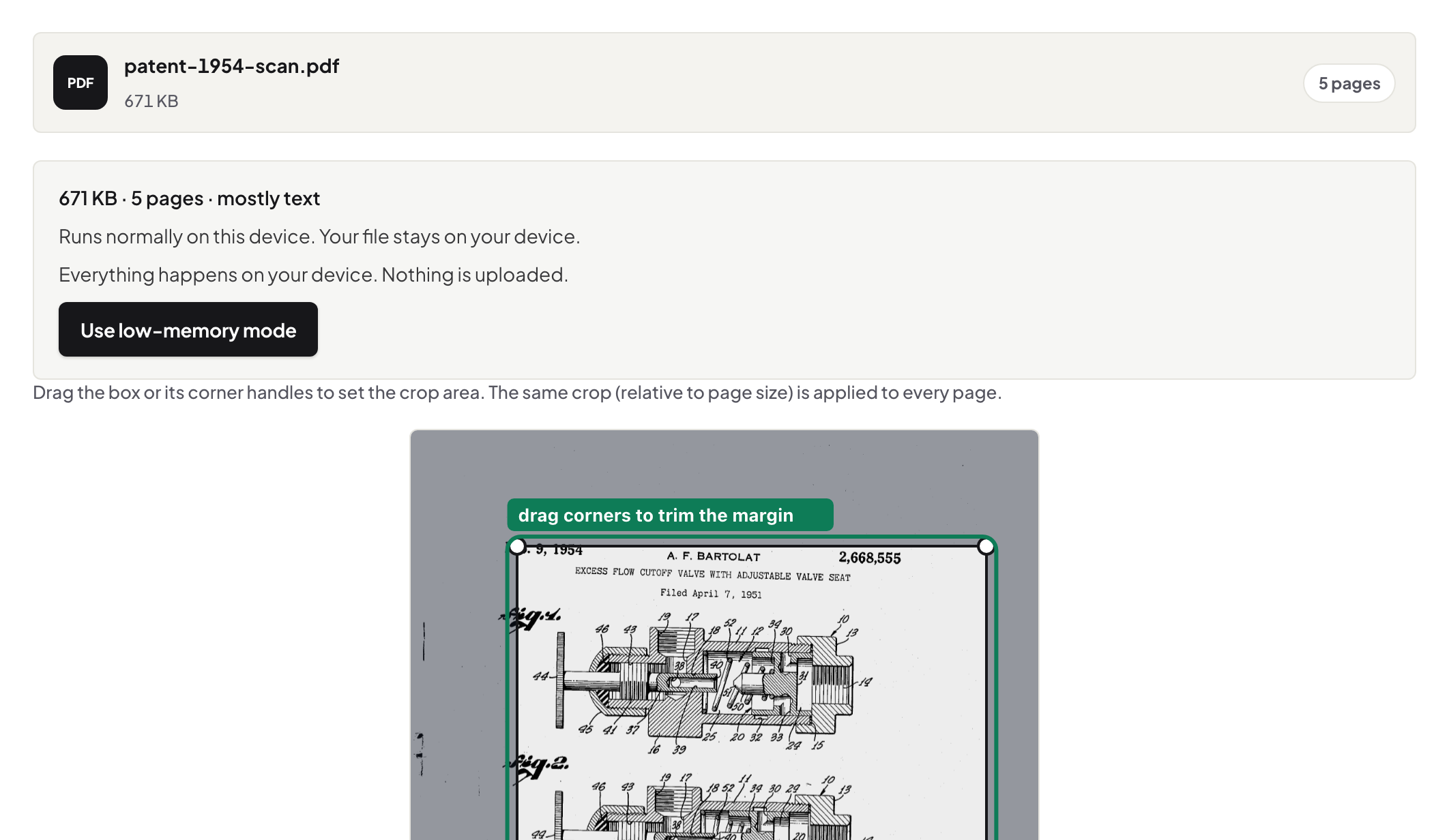
Cropping a PDF's margins — what actually changes in the file
Blog
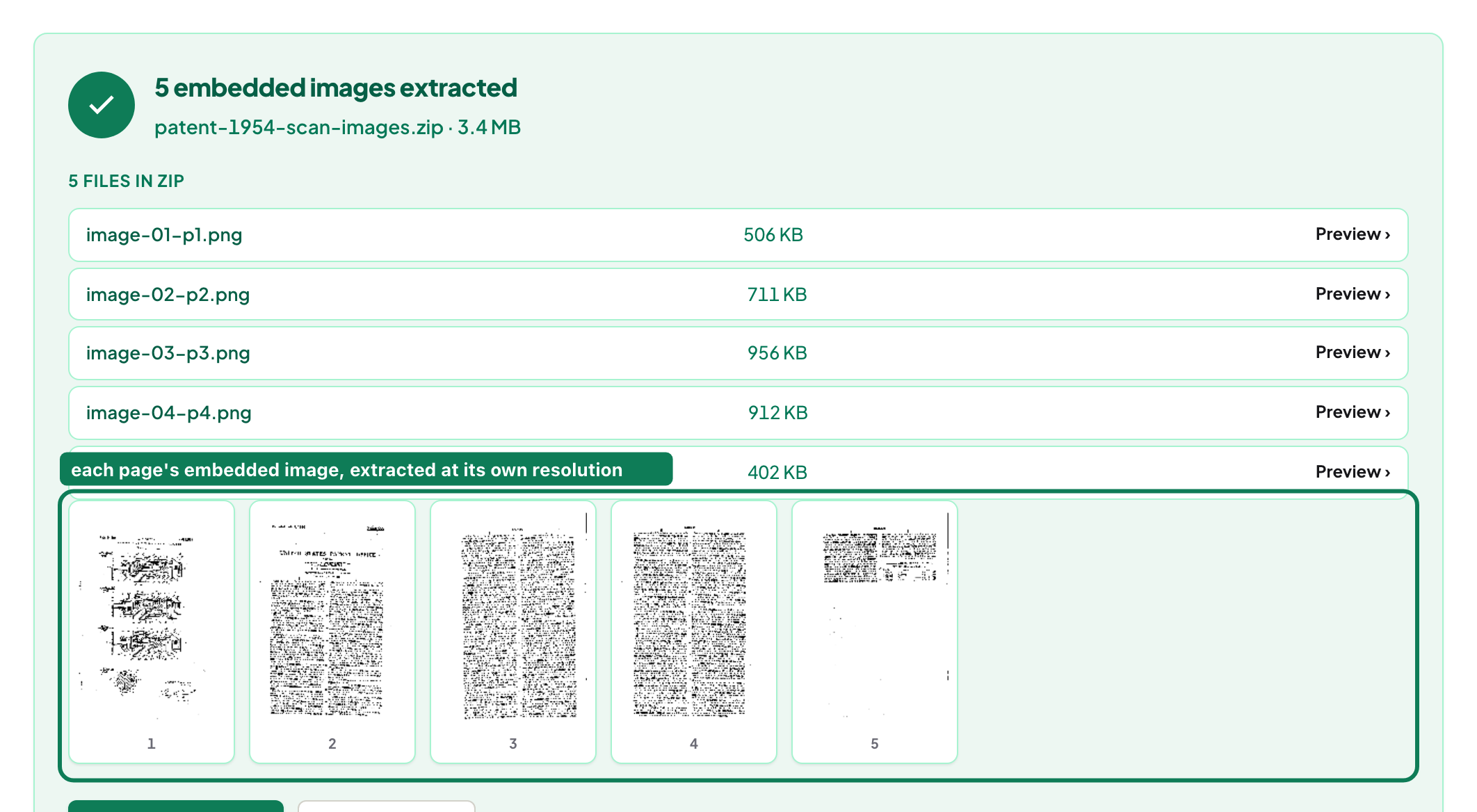
Getting the actual images out of a PDF, not screenshots of them

Blog
Inside a PDF repair: four strategies, and which one worked
Blog
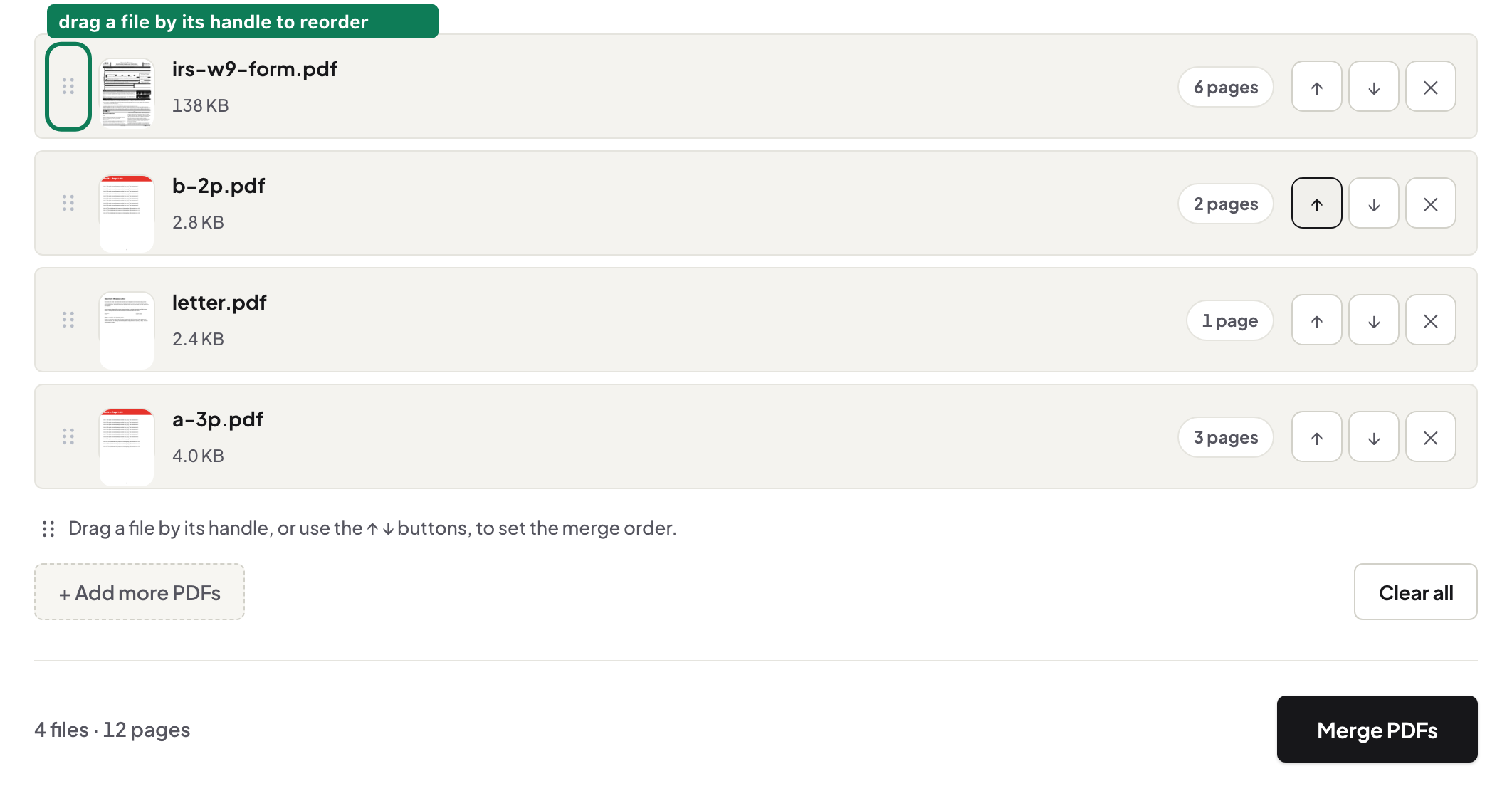
One application, five sources: assembling a single PDF that reads right
Blog
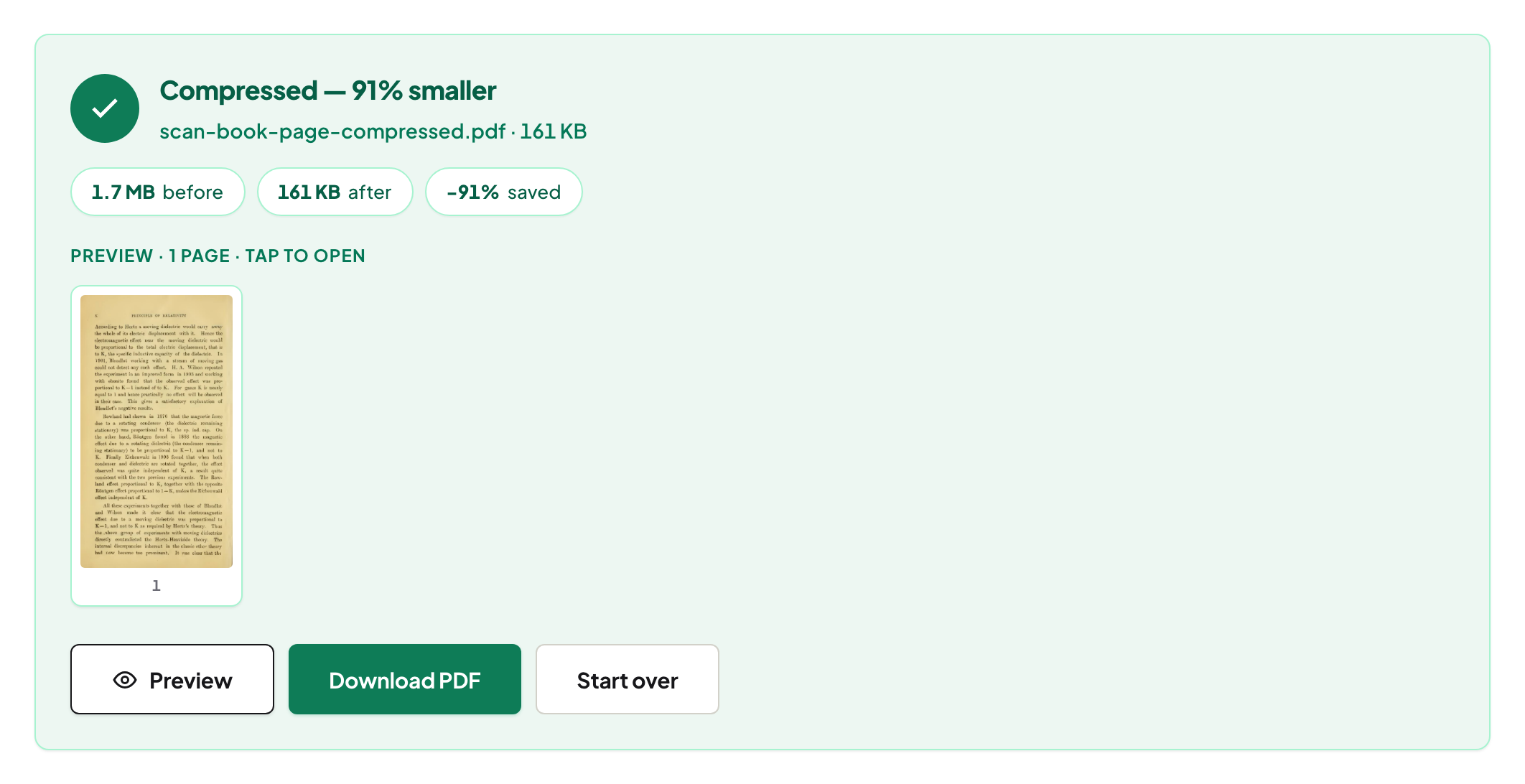
Why a PDF gets huge, and what compression really does about it
Blog
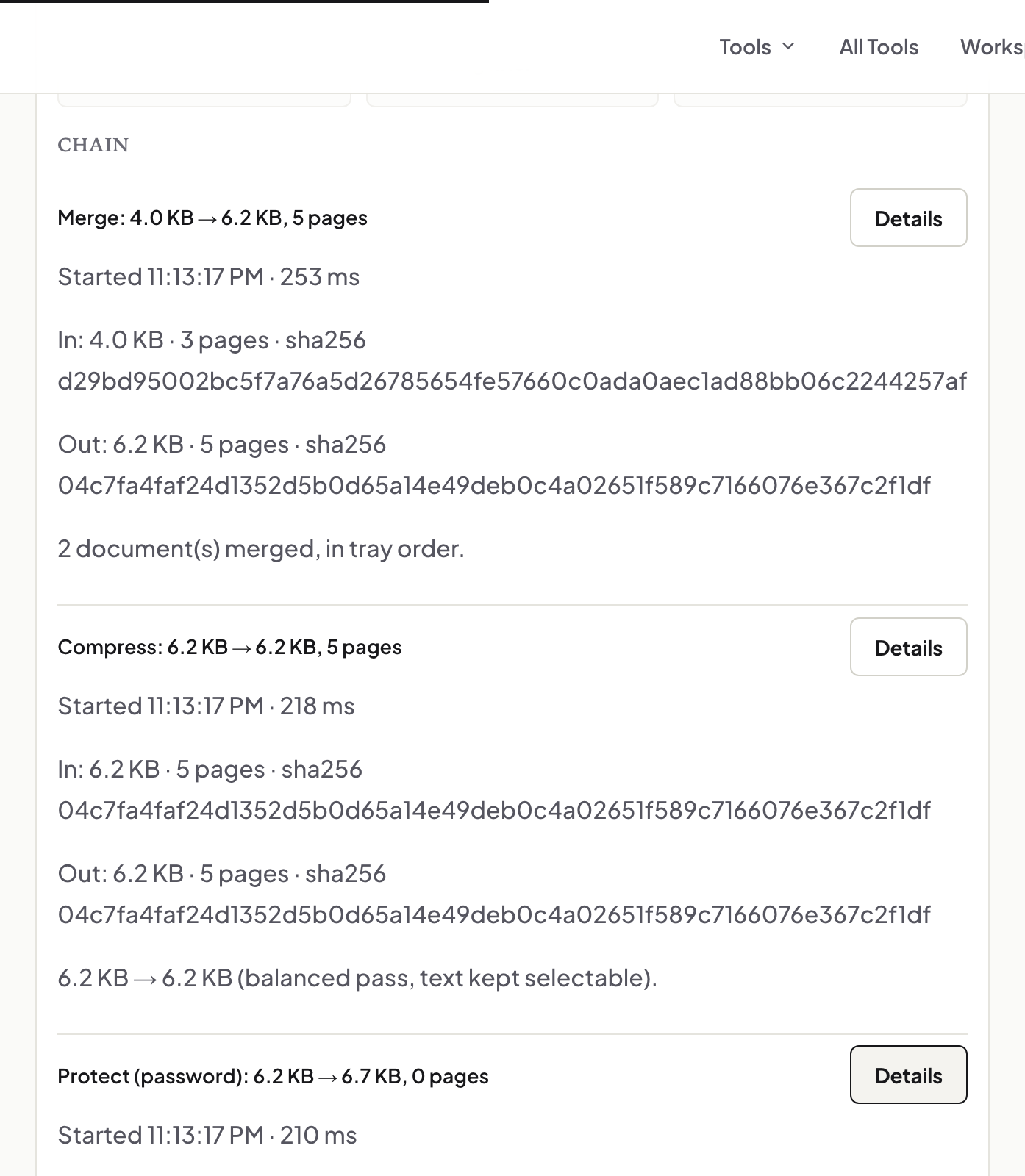
One document, several tools, and a receipt for the whole chain
Blog
Merging PDFs properly: order, size, what survives, and what to check
Blog
Getting the images out of a PDF at the quality they went in
Blog
Signing a PDF in your browser: the three signature methods and what each one is
Blog
Turning a PDF table into a spreadsheet you can actually sum
Blog
Three ways to split a PDF, and when each one is right
Blog
Converting a PDF to an editable Word file: what you get back
Blog
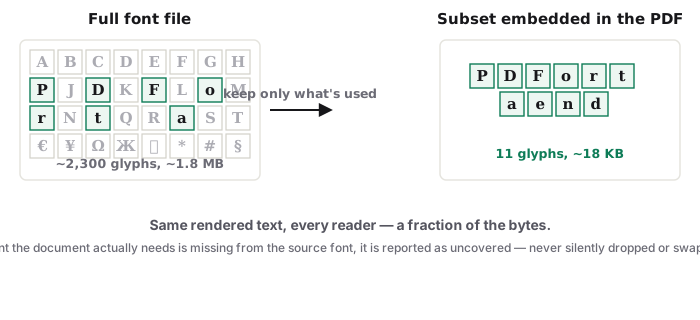
Converting Word to PDF so the text arrives intact — including Cyrillic, Greek and more
Blog
Balanced and Maximum: what each compression mode actually does to your file
Blog
Cropping a PDF: the same crop on every page, and what a crop box really does
Blog
A redaction checklist: remove, verify, log, and only then send
Blog
Making a scan searchable in any of 126 languages, without uploading it
Blog
Editing text in a PDF so nobody can see it was edited
Blog
Invoices in, one numbered bundle out: a monthly routine that takes ten minutes
Blog
Getting twelve months of statements into one sheet, on your own machine
Blog
Building the application bundle recruiters actually want
Blog
An onboarding pack that is signed, final, and private
Blog
A teacher's week in PDFs: worksheets, slips, scanned homework
Blog
A production you can defend: redact, number, label, and log — with hashes
Blog
Choosing a free PDF editor when the document must stay on your machine
Blog
Using PDF tools without signing up — and what you are trading when a site makes you
Blog
Two tools, one compliant-sized photo: background removal, then the country preset
Blog
Sharing a statement with a landlord or broker without sharing everything
Blog
From a 400-page scan to searchable chapters, on your own computer
Blog
Archiving a PDF properly: PDF/A-2b, explained without the standard's jargon
Blog
Crop or redact? The one question that decides it: does the content have to be gone?
Blog
Two ways to finalise a marked-up PDF, and which one your recipient wants
Blog
Photos inside the PDF, or pictures of the pages? Two tools, one decision
Blog
Recognise first, or extract now? One check tells you which tool
Blog
Over the limit: compress, split, or shrink the pictures — which one, in which order
Blog
Locked PDFs: open, unlock, re-protect — and why no tool here guesses passwords
Blog
From a phone photo to a straight, searchable, small PDF — four steps on the phone
Blog
Three stamps that look alike and do different jobs
Blog
Spotting the change in a revised contract without reading every line
Blog
Text stays text, or turns into a picture: what each tool does to your document
Blog
The author field you forgot: cleaning a PDF's metadata before it leaves
Blog
Why the page is sideways again: view rotation vs saved rotation
Blog
Wrong paper size: fitting a PDF's pages to A4, Letter, A5 or a custom size
Blog
A watermark tells people what a copy is; it does not stop them. Use it for that.
Blog
From pasted HTML to a real PDF: page breaks, running headers, selectable text
Blog
One page as a crisp picture: choosing the DPI and the format
Blog
One book in, one file per chapter out — using the outline the author already made
Blog
What happens when you OCR a scan here: engine, language packs, confidence
Blog
Shrink a PDF on your iPhone in Safari — no app, nothing uploaded
Blog
Combine PDFs on iPhone or Android — order them, merge, download
Blog
Edit PDF text on Windows with nothing installed — the browser is enough
Blog
Turn camera photos into a single PDF, on the phone that took them
Blog
The form came to your phone. Fill it, sign it and send it back from there
Blog
Remove pages from a PDF — same tool on laptop and phone, and what "deleted" means
Blog
A full PDF toolkit for the machines nobody writes installers for
Blog
Turn a .docx into a PDF on your phone — before it reaches anyone who will open it wrong
Blog
The portal says 20 MB. Your thesis says 84. Close the gap without wrecking it
Blog
Six chapter files, front matter, appendices: one submission PDF, in order
Blog
Roman for front matter, arabic from chapter one: numbering a thesis PDF
Blog
The repository wants PDF/A. What that means and how to hand it one
Blog
Four people, nine files, one deadline: assembling the group submission
Blog
Getting text and tables out of reading-list PDFs without retyping them
Blog
The small-business paper trail: quote, contract, signature — all PDF, all traceable
Blog
DRAFT on drafts, your name on deliverables: watermarking as business hygiene
Blog
A year of receipts, one storable archive: compressing bookkeeping scans
Blog
Your prices live on your website. Turn that page into the PDF people ask for
Blog
Payroll, offers, client data: put a password on the PDF, send the password separately
Blog
Crooked, sideways, unsearchable: the three fixes that make scans filable
Blog
Deed, disclosures, inspections, floor plan: one packet a buyer can actually read
Blog
The lease is in your email and the landlord wants it today: sign it from the phone
Blog
Sixty photos of a flat, one orderly document: condition reports and listings
Blog
Sharing application files without leaking applicants' lives: redaction for landlords
Blog
The listing packet is 48 MB and the mail server's limit is 25: fix it in the browser
Blog
No Acrobat on this machine: editing PDF text in the browser instead
Blog
Print, sign, scan, email is four steps of losing quality. Sign the PDF directly
Blog
Convert a PDF to Word with no account, no email, and no upload
Blog
Make a scan searchable with no Acrobat and no upload — the browser carries it
Blog
Reorder, rotate, delete: page surgery in the browser, nothing installed
Blog
Combine files and get your document back — not an advert stamped on it
Blog
You know the password — you're just tired of typing it. Save an open copy
Blog
You need page 12, not the document: pulling single pages out cleanly
Blog
Half the report is .docx, half is PDF: one document out, in the right order
Blog
Ninety seconds before hitting send: what a PDF says about you beyond its pages
Blog
It looked perfect on your machine: fonts, annotations, and the other-computer problem
Blog
Send the document, not a blurry photo of it: PDFs sized for messaging apps
Blog
Letterhead after the fact: headers, footers and marks on an existing PDF
Blog
The deck was for the room; the handout is for afterwards. Convert it properly
Blog
Honest scope: what editing text inside a PDF really covers, and where the source file wins
Blog
Fix it in place, or take the words out: the decision that picks your tool
Blog
Preview can crop, our tool can crop — the real differences, credited fairly
Blog
The statement is on your phone and someone needs it today: redact it there
Blog
Two locks, right order: remove what must go, encrypt what remains
Blog
Locked files, vector logos, phone workflows: image extraction off the happy path
Blog
Joined files, lost outline: what happens to bookmarks in a merge, and the honest fixes
Blog
Three PDFs and four photos into one document: the convert-then-merge chain
Blog
The locked statement is too big to send: unlock, compress, re-protect
Blog
The anatomy of a heavy PDF: where the megabytes actually live
Blog
Same split, any machine: page ranges in the browser wherever the file lives
Blog
Apple's Markup can sign, so can the browser — an honest comparison from the signature line
Blog
Disappearing, blurry, wrong size, won't save: every signature failure, diagnosed
Blog
Recognition is only as good as the scan: the five habits that raise every score
Blog
Shifted columns, merged-cell wreckage, numbers-as-text: repairing extracted tables
Blog
The table is a photograph: recognition first, extraction second, verification always
Blog
Two different conversions share one name: born-digital vs scanned, routed correctly
Blog
.docx first-class, .doc supported: the formats question answered plainly
Blog
Append the annex, insert the missing page: growing a PDF that already exists
Blog
No signature-request platform here — an honest relay that works anyway
Blog
The chatbot is useful and the contract is confidential: prepare the document first
Blog
Feed the model clean structure, not page soup: extracting PDFs for AI work
Blog
"This domain appears unsafe": what AI warnings are actually based on, and the checks that beat them
Blog
The assistant summarised three pages of nothing: your PDF was pictures, not text
Blog
A README for AI: the small file that tells assistants what a site actually is
Blog
Excel to PDF: when the recipient should read your numbers, not edit them
Blog
The fastest text-to-PDF there is: paste, typeset, download — nothing fetched, nothing run
Blog
HEIC: why your photos bounce, and the on-device fix
Blog
The thread that proves it: converting an .eml to a PDF that will still open in 2036
Blog
Metadata, comments, attachments, scripts: the sanitize pass that shows you first
Blog
Fold a stack of paper into a book: imposition without the print-shop bill
Blog
The document is finished; the letterhead isn't on it. Overlay, under, done
Blog
Lines on paper become fields on screen: form-making without a form designer
Blog
Two pages per sheet, unreadable on every screen: split the book back into pages
Blog
Eighty pages, forty of them paper-coloured nothing: measured blank removal

Guide
Adding text vs editing existing text in a PDF — two different jobs

Guide
Bates numbering — what it is, the conventions, and how to stamp a production set

Guide
Why is my PDF blurry — and which blur can actually be fixed

Guide
Can the old text be recovered after you edit a PDF?

Guide
How to cancel a PDF operation safely

Guide
Is that redaction real? Check a redacted PDF for text still under the boxes

Guide
How to compress a 100MB PDF locally

Guide
How to compress a PDF for email without wrecking quality

Guide
How to compress a PDF for government portals (USCIS, visa and application systems)

Guide
How to compress a PDF to 100KB (and when that's possible)

Guide
How to compress a PDF to under 1MB

Guide
How to compress a PDF to under 2MB

Guide
How to compress a PDF to 500KB without wrecking it

Guide
How to convert a document with Cyrillic or Greek text to PDF

Guide
How PDF editors keep the same font — or quietly fake it

Guide
How to edit text in a PDF — change existing text and keep the same font

Guide
How to edit text in a scanned PDF — with local OCR

Guide
Email to PDF — archive an .eml as a clean, paginated record

Guide
Excel to PDF — what prints, what doesn't, and why that is the honest contract

Guide
Stamp exhibits for a filing — labels, cover sheets and an index, in batches

Guide
Extract original embedded images vs converting PDF pages to JPG

Guide
How to extract every image from a PDF at once

Guide
How to extract images from a PDF without taking screenshots

Guide
How to extract text from a PDF — the four routes that actually work

Guide
Get the text out of a PDF — plain text or Markdown, in reading order

Guide
How to flatten annotations, comments and stamps into a PDF

Guide
Add running headers and footers to a PDF — titles, dates, page X of N, filenames

Guide
HEIC to JPG or PDF — iPhone photos, decoded on your device

Guide
How to process a large PDF without uploading it

Guide
How UnboundPDF handles large PDFs locally

Guide
Large PDFs on desktop vs mobile — what we measured

Guide
Letterhead on any PDF — overlays, under versus over, and what covering is not

Guide
Make a booklet from any PDF — imposition, the fold, and the printer settings

Guide
Make a PDF form fillable — real fields, drawn where the blanks are

Guide
Markdown to PDF — including plain text, which is already valid Markdown

Guide
How to merge and compress a PDF on Android without an app

Guide
How to merge and compress a PDF on iPhone without an app

Guide
How to merge and compress PDFs on a Mac

Guide
How to merge and compress PDFs on Windows 10 and 11
%3C%2Ftext%3E%20%3Cpath%20d%3D%22M24%20176%20h60%22%20stroke%3D%22%2317171A%22%20stroke-width%3D%223%22%20stroke-linecap%3D%22round%22%2F%3E%20%3C%2Fsvg%3E)
Guide
How to merge PDFs privately (no upload)

Guide
How to OCR a large scanned PDF without freezing

Guide
How to OCR a PDF in more than 100 languages

Guide
How to OCR a scanned PDF in your browser

Guide
Passport photo sizes by country — and how to make one at home

Guide
PDF opens blank: the five things that actually cause it

Guide
PDF fonts not displaying correctly — why the same file looks different on every machine

Guide
PDF Privacy Lab — prove no-upload with DevTools

Guide
Why typed cells matter when you convert a PDF to Excel

Guide
PDF tools for accountants — statements, invoices and year-end archives

Guide
PDF tools for freelancers — proposals, contracts, invoices and portfolios

Guide
PDF tools for HR — CVs, contracts, onboarding packs and redaction

Guide
PDF tools for lawyers — contracts, exhibits, redaction and archival

Guide
PDF tools for real estate — listing packs, disclosures and deeds

Guide
PDF tools for small business — quotes, invoices, staff forms and records

Guide
PDF tools for students — assignments, thesis chapters and scanned readings

Guide
PDF tools for teachers — worksheets, handouts and scanned homework

Guide
Why won’t my PDF open? Diagnose it, then repair it locally

Guide
How to redact a PDF so the text is actually gone

Guide
A redaction log you can hand over — every region, verified on the final bytes

Guide
Remove the background from a portrait — in your browser, no upload

Guide
Remove blank pages from a scan — measured ink, and a review before anything goes

Guide
Remove a watermark from a PDF — when it is possible, and when it is not

Guide
Resize an image to a file size or pixel size — without guessing

Guide
Sanitize a PDF — see what it carries besides its pages, then strip what you choose

Guide
Split a two-up book scan — one sheet, two pages, the line where you put it

Guide
How to split a PDF by its bookmarks or chapters

Guide
Why browser PDF tools freeze on large files

Guide
Why can’t I edit text in my PDF? The 7 real reasons

Guide
Why in-browser PDF tools are faster — measured

How-to
Compress a PDF without uploading

How-to
How to crop a PDF without uploading it

How-to
Flatten a PDF without uploading

How-to
How to find and redact SSNs, IBANs and card numbers in a PDF

How-to
How to OCR a PDF in Vietnamese, Polish or Turkish

How-to
How to split a book PDF into chapters

How-to
Convert JPG to PDF without uploading

How-to
How to merge PDF files without uploading them

How-to
OCR a PDF without uploading

How-to
Convert PDF to Excel without uploading

How-to
Convert PDF to JPG without uploading

How-to
Convert PDF to Word without uploading

How-to
Password-protect a PDF without uploading

How-to
Redact a PDF without uploading

How-to
How to rotate PDF pages in your browser (and make it stick)
%3C%2Ftext%3E%20%3Cpath%20d%3D%22M24%20176%20h60%22%20stroke%3D%22%238A5A00%22%20stroke-width%3D%223%22%20stroke-linecap%3D%22round%22%2F%3E%20%3C%2Fsvg%3E)
How-to
How to sign a PDF in your browser (without uploading it)

How-to
How to split a PDF without uploading it

How-to
Unlock a PDF without uploading

How-to
How to watermark a PDF without uploading it

How-to