How to edit text in a PDF — change existing text and keep the same font
Updated 20 August 2026
To edit text in a PDF, open UnboundPDF’s free editor in your browser, click the paragraph, and retype it. The editor rewrites the text inside the page in the document’s own embedded font, so the changed line matches its neighbours. Your file never leaves your device — it is processed in the browser tab and downloads from there. No account, no watermark.
Edit existing text in a PDF online, free, and keep the same font. Click a paragraph, retype, save — processed in your browser, not uploaded.
UnboundPDF is a free suite of 54 PDF and image tools that run entirely in your browser — merge, split, compress, edit text, OCR in 126 languages, redact, sign, convert and archive to PDF/A. Your document is read and written by the page on your own device; there is no document-upload endpoint in the core tools, no account, no watermark and no daily cap. Every result can be checked — with the Network tab, or with the Document Passport the Workspace writes for a chain of steps.
- Open the PDF Editor and drop in your file (or load the sample to try it first).
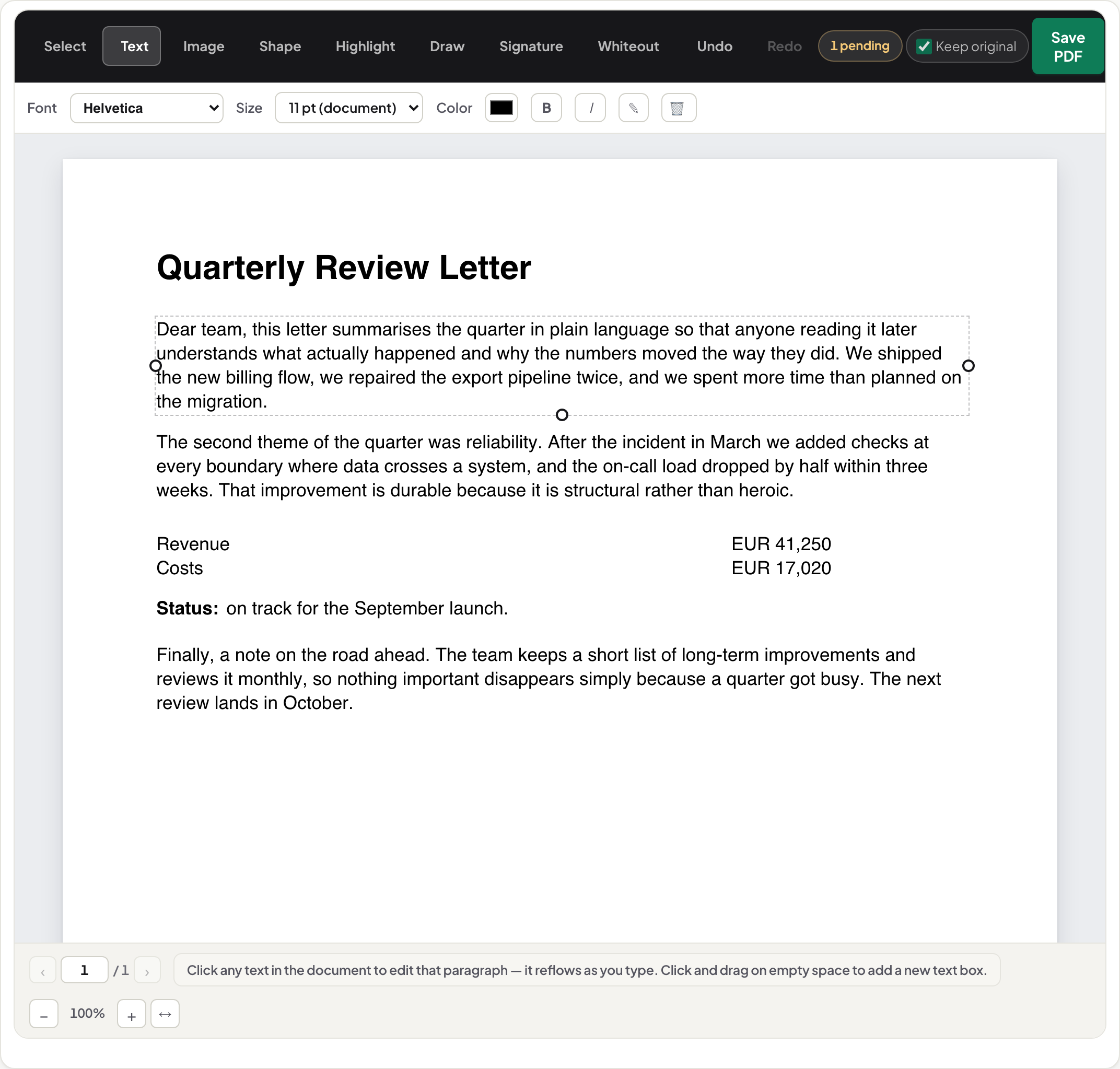
- Choose Text, then click the paragraph that needs changing. One click selects the whole paragraph as a single flow.
- Retype or correct the text. The line re-flows live in the document’s embedded font; the size control shows the document’s own value, for example “11 pt (document)”.
- Check the result on screen — what you see is what the saved file breaks at. Undo if needed.
- Save PDF. The download comes from your own browser; nothing was sent anywhere.
Nothing is uploaded. The file is read into your browser’s memory, edited there, and the result downloads from the same tab. You can confirm this yourself with the network panel open — the PDF Privacy Lab shows how.
What “editing text in a PDF” actually means
A PDF page is a list of drawing instructions: put this glyph here, in this font, at this size. There is no paragraph object, no word-processor flow. So when you change a word, something has to rewrite those instructions — and most online “PDF editors” do not. They lay a white rectangle over the old words and draw new ones on top. Select the area in any reader and the patch shows; search the file and the old words are still there.
UnboundPDF’s editor edits in place. Click a paragraph and it reads the page’s text operators, lets you retype, and writes the paragraph back — the original operators are removed, not covered. Saved files stay real text PDFs: you can reopen them and edit again, and the person you send it to sees ordinary text, not a patch.
How to edit existing text in a PDF (step by step)
The steps above are the whole procedure; here is what to expect at each one.
Opening. Drop the file onto the editor. Large documents open page by page — the first page appears before the rest has finished loading, so a long report or a scanned book does not block you with a blank screen.
Selecting. Choose Text and click the paragraph. The editor treats the paragraph as one flow, so a correction in the middle re-flows the lines that follow at the document’s own leading. If you only need a word, click and correct the word; the rest of the paragraph moves as it would in a word processor.
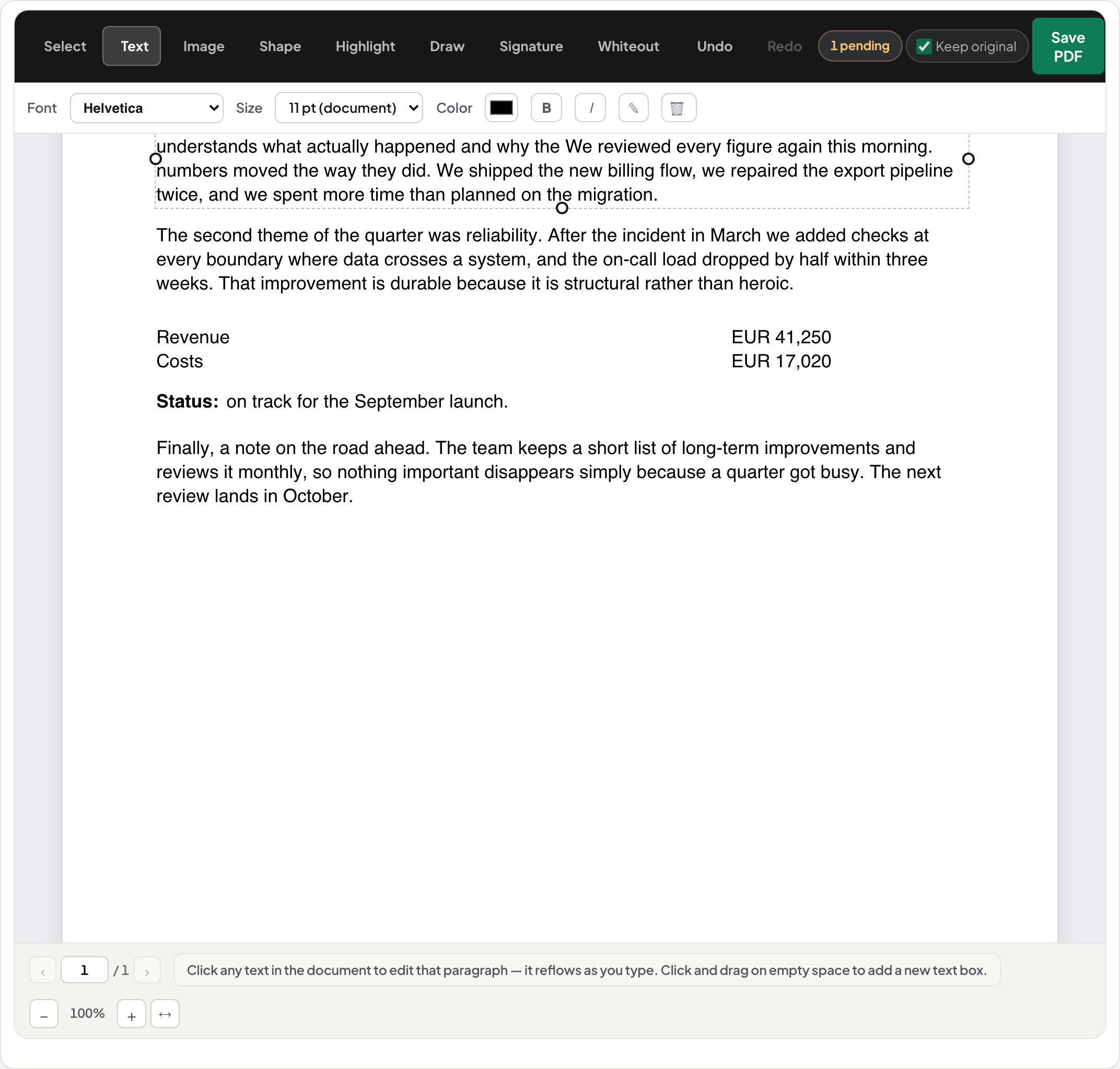
Typing. The font control names the document’s font — never a silent Helvetica. The size shows the document’s value.
Saving. Save PDF writes a new file and downloads it. The original stays untouched on your disk. Reopen the new file in the editor and it is still editable text.
Keeping the same font — how it works, and when it cannot
This is the part most editors fake. A PDF usually carries its own fonts embedded inside the file, often as subsets containing only the characters the document used. UnboundPDF re-sets your typed text in that embedded font, so the edited line is set in the same face, the same size, and the same spacing as the lines around it. The “same font” is not a lookalike chosen from a menu; it is the font object already in the file.
Two situations stop that. First, a subset font that does not contain the character you typed — a document that never used a “ß” cannot lend you one. Second, an unusual encoding that cannot be rewritten safely. In both cases the editor tells you plainly instead of substituting a different font and hoping you will not notice. The mechanics, including how other tools hide the substitution, are in how PDF editors keep the same font — or quietly fake it.
Which PDFs edit cleanly, and which do not
True text PDFs — contracts, letters, invoices, exported reports — edit cleanly. Their text layer and fonts are intact, and that is what the editor rewrites.
Scanned PDFs contain no text until it is recognised. Click scanned text and the editor runs OCR on your device, then lets you correct the recognised words; the replacement is blended into the scan’s own paper texture so the edited line belongs to the page rather than sitting on a white box. Expect scan-quality results, and read how to edit text in a scanned PDF before you start — it covers what OCR can and cannot give you.
Forms with fillable fields are a different job. Use Fill & Sign for the fields; the editor is for the printed text around them.
Pages that refuse. If a click does not open an edit at all, one of seven real reasons is in play — outlined text, text drawn as vector shapes, a locked file, an encoding the editor will not rewrite — and each has a way forward.
Editing text online, free, without an account
The editor is free and needs no sign-up. “Online” here means it runs in your browser, not on a server: the page loads the editor once, and from then on your document is processed by your own device. That is why there is no file-size tier, no watermark on the output, and no copy of your document sitting anywhere to be retained or leaked — there is nothing to retain. It also works on a phone or tablet; tap the paragraph instead of clicking.
Change text in a PDF vs. add text to a PDF
These are different actions and different tools. Changing text means the words already on the page are replaced — what this guide covers. Adding text means a new line, caption or note goes somewhere the page was blank; that is annotation, and the editor does it too, but it is not the same as retyping a sentence. If you are not sure which you need, add text vs. edit text in a PDF spells out the difference and what each leaves behind in the file.
On Mac, Windows, iPhone, Android — the same four steps
There is no separate app per platform to learn. macOS and Windows: open the editor in any browser, click, retype, save. iPhone and Android: the same page — tap the paragraph, the keyboard opens, the toolbar sits within thumb reach; the saved file lands in your downloads. Chromebooks and Linux work because the browser is the whole requirement. One method, and your document stays on the device in every case.
Scope
Multi-column layouts, decorative fonts with unusual encodings, and text converted to outlines are refused with a named reason rather than rewritten wrongly — a clear message beats a silently broken page. Scans are edited through on-device OCR and behave like scans. When a page cannot be edited in its structure, the editor says so, covers instead, and offers to erase the replaced words from the file for good.
Related tools and guides
Use the PDF Editor for the edit itself. If the file is locked, Unlock PDF first (you need the password). To remove words rather than change them, Redact PDF deletes the text from the page instead of painting over it. For scans, start with OCR PDF. Guides: edit text in a scanned PDF · keep the same font · why a PDF won’t let you edit.
Frequently asked questions
How do I edit existing text in a PDF?
Open the PDF in UnboundPDF’s editor, choose Text, click the paragraph and retype it. The editor rewrites the paragraph inside the page in the document’s own font and removes the old text operators, so the saved file is a real text PDF, not a patched image. Save PDF downloads the result from your browser.
Does this PDF text editor keep the same font, and is it free?
Yes to both. When the embedded font is safely reusable, your typed text is set in the exact font already inside the document, so the edited line matches its neighbours. When it cannot be reused safely — an unusual encoding, or a subset missing the character you typed — the editor says so instead of quietly swapping in a lookalike. It is free, with no account and no watermark.
Can I edit PDF text online without uploading the file?
Yes. The editor runs in your browser; the document is read into the tab’s memory, edited there, and the result downloads from the same tab. No copy is sent to a server. You can verify this with your browser’s network panel — the PDF Privacy Lab guide shows the steps.
Can I edit text in a PDF without Adobe Acrobat?
Yes. UnboundPDF’s editor changes existing PDF text directly in your browser — free, no account, no watermark. Click a paragraph, retype it, and save.
Can I edit text in a scanned PDF?
A scan has no text layer, so nothing is editable until the text is recognised. Click the scanned text and UnboundPDF runs OCR on your device, then lets you correct the recognised words; the replacement is blended into the scan’s own paper texture. Expect scan-quality results — see the scanned-PDF guide.
Is the old text really removed from the file?
In a normal edit, yes — the original text operators are removed from the page’s content stream, not covered up. When a page cannot be edited in its structure, the editor falls back to covering, tells you the replaced words remain inside the file, and offers an explicit option to erase them for good.
Why can’t I click a word to edit it?
Usually because the “text” is not text: it was drawn as outlines or vector shapes, it is a scan, or the file is locked. Sometimes the encoding cannot be rewritten safely and the editor declines rather than risk a broken page. The guide “why can’t I edit text in a PDF” walks through each case and what to do instead.
Will the edited PDF look different in other readers?
No. Because the text is re-set in the document’s own embedded font and written back as ordinary text operators, Acrobat, Preview, Chrome and phone readers all show it as normal text. There is no white box and no second layer to reveal.